
Cognita by Protecht
Cognita, the AI built into the Protecht platform, helps risk teams capture, assess and understand risk in plain language. It works with your configuration and leaves people accountable for material decisions.
Protecht is bringing AI deeper into the flow of risk management, so businesses can move faster, make better decisions and stay in control. Cognita streamlines routine work, makes insight available on demand and brings the right guidance to people when they need it.
-
Capture: get it down right, the first time.
AI Drafting and AI-Assisted Editing help people describe risks and incidents clearly.
-
Assess and act: get the work done.
Risk Assessment Flow guides risk owners through reviewing a defined group of related risks in one conversation, with suggested ratings and control recommendations they can accept, edit or reject. AI vendor assessment in VRM and in-product navigation help teams move from information to action.
-
Understand: know what your risk data is telling you.
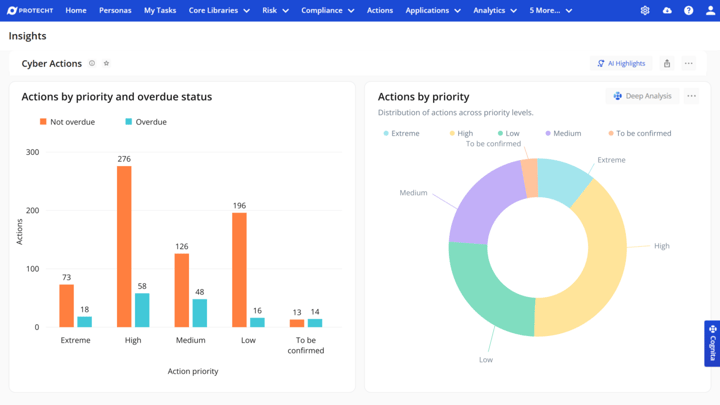
With AI Analytics, ask questions in Cognita chat and get answers with charts, explore dynamic dashboards and go deeper with Deep Analysis.
Assess and act
Sharper assessment. Stronger challenge.
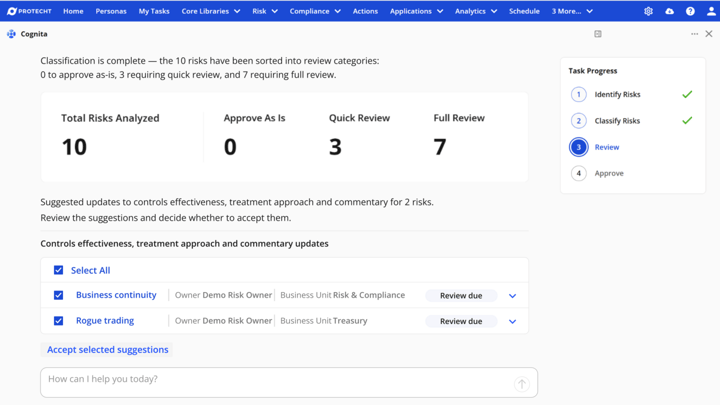
Risk reviews usually happen record by record, and context gets lost along the way. With Risk Assessment Flow, risk owners tell Cognita what has changed, once, in plain language. Cognita applies it across a defined group of related risks, brings in linked controls, incidents and issues, and recommends updates with explanations. Cognita recommends. People decide.
- Owner-led conversation: review related risks in one guided conversation
- Connected risk information: see risks, controls, incidents and issues together
- Flexible reviews: run periodic reviews, single-risk deep dives or themed reviews
- Consistent, defensible assessments: suggested ratings and control recommendations, each explained
- Human control and auditability: accept, edit or reject every recommendation, with a record of what changed and why
Extend intelligence across third parties.
Combine AI-assisted vendor assessment from Cognita with your wider risk context in VRM, so teams can review evidence, challenge conclusions and decide what action is needed.
Understand
Ask it. Chart it. Act on it.
Stop waiting for a report. Cognita gives leaders clear, structured insight, helping them see what matters and what to do next. Ask a question about your risk data in plain language in Cognita chat and get an answer with a chart. Refine it through conversation, drill into the detail and use AI to take a closer look at trends.
- Ask: plain-language questions, answered with charts and tables where they help
- Look closer: explore Liveboards and go deeper with Deep Analysis
- Share with confidence: describe a chart and AI helps build the Liveboard; Verified Liveboards show everyone which numbers are agreed
All inside Protecht, with no separate BI tool, and always respecting your data permissions.
Capture
Don’t let a missed incident become a headline.
Cognita helps you capture complete, high-quality incident data, reduce duplicates and turn reporting into meaningful insight, so you can prevent recurrence and strengthen controls before risk escalates.
- Natural language guidance that helps users log incidents quickly, accurately and consistently
- AI-supported incident review and actioning to accelerate investigation, resolution and accountability
- Identification of clusters of similar incidents that may indicate systemic issues
You set the standard. Cognita helps your team meet it.
Cognita acts as your extended coaching bench, giving just-in-time guidance at the point of work so your team can focus on stronger risk leadership.
- AI Drafting and AI-Assisted Editing help people describe risks clearly, in plain language
- Step-by-step navigation through forms helps users complete tasks accurately and consistently
- Embedded guidance on risk and compliance concepts, grounded in Protecht’s proven methodologies
- Access to Protecht’s expert-led training, industry frameworks and thought leadership, built into the workflow
Faster, smarter incident reporting with Cognita.
See how Cognita guides users to capture complete, accurate incident data.
Expert guidance and everyday navigation with Cognita.
See how Cognita explains risk concepts in plain language and takes users to the task they need.
AI-powered report insights in Protecht.
See how Cognita turns scheduled dashboards and reports into structured insight for leaders.
Cognita is the AI built into the Protecht platform to help risk teams capture, assess and understand risk in plain language. Unlike general-purpose AI tools, Cognita is grounded in Protecht’s trusted methodologies and authoritative GRC content, ensuring responses are aligned with real-world compliance practices and your own data.
Cognita works directly within the Protecht platform and respects your configuration, securely interpreting information in context, rather than generating generic responses.
No. Cognita recommends. People decide. It is designed to support your teams, not replace them, with human review and approval built into every interaction.
It automates repetitive tasks, improves the quality and consistency of records, and explains complex data in clear language, allowing your teams to focus on oversight and decision-making. Cognita never saves a change or overwrites what you’ve typed without your approval, and people stay accountable for decisions.
Version history keeps a record of what changed, so reviewers can see when a change was made and challenge it.
Cognita acts as an intelligent assistant, guiding users with clear, contextual explanations as they complete tasks, so users learn as they go. People with less risk experience can work with confidence, and experienced users spend less time checking others’ work.
- Answers questions about your risk data with AI Analytics. Ask in plain language and get answers with charts, so people get insight without waiting for a report. AI also helps users create Liveboards easily: describe the chart you want and AI helps build it, and Verified Liveboards show everyone which numbers are agreed. Liveboards include AI Highlights that point out what stands out, and Deep Analysis lets you ask deeper questions of the data.
- Adds an AI summary to scheduled reports, covering key themes, trends, priority takeaways and links to key items. Leaders get the main points without reading every page.
- Supports risk and control self-assessments with Risk Assessment Flow. Cognita reviews a risk owner’s risks, considering linked controls, related risks and what the owner tells it about their role. It sorts the risks into those ready to approve, quick updates and those needing a closer look, then suggests changes for each and explains each suggestion. The owner decides what to accept.
- Helps users log new incidents with AI Drafting. Users describe what happened in their own words and add photos or documents. Cognita turns this into a complete draft record for them to check, so they don’t need to know which fields to fill in or what each one needs. Incident logging is quicker, easier and more consistent.
- Helps users complete and improve records with AI-Assisted Editing. Users click Suggest on a field to get a recommended response when working on incidents, risks and controls. Cognita considers the record’s details and linked records, and explains its reasoning. Users can accept a suggestion, ask for more detail or choose their own response.
- Sums up what is linked to a record, such as new incidents, controls or audit findings. Users can see what has changed and what it means without opening every record.
- Answers questions about how to use Protecht and good risk practice. It draws on Protecht best practice Academy courses and help guides, with citations, so users get help when they need it.
- Assists with platform navigation by taking users to the page they need.
Yes. When Cognita answers questions about risk practice or how to use Protecht, it first searches Protecht’s own curated content, such as Academy courses, help guides and blogs, then builds its answer from what it finds. This approach is known as retrieval-augmented generation (RAG). It keeps answers grounded in trusted information instead of general internet knowledge, reduces the risk of bias, hallucinations and misleading answers, and lets Cognita reference where its answer came from.
When Cognita makes suggestions on a record, it works from that record and the linked records you have access to.
Whether it’s helping log an incident, explaining risk information, drafting a report summary or answering questions about your data, Cognita shows what the data says. AI-drafted content is clearly marked, and nothing is saved until you accept it.
Safety checks block harmful content and attempts to misuse Cognita. Subject-matter experts test outputs before release, and we keep monitoring them after launch to find and fix issues.
Cognita adheres to ethical AI principles, including human-in-the-loop oversight. People stay accountable for material decisions: Cognita prepares, surfaces and recommends, and people decide. All AI-generated outputs are subject to user review, so accountability and control remain with your teams.
Cognita works within your configuration and existing permissions, so it only uses records you already have access to. Records show when Cognita helped create or edit them. Customers control permissions for both human users and Cognita. Version history and audit metadata keep a record of what changed.
Yes. Users can always accept, edit or reject suggestions before they are saved. Cognita never enforces decisions or makes changes without user approval.
Version history keeps a record of what changed, so reviewers can see when a change was made and challenge it.
Yes. Your data is encrypted, hosted in your region, and never used to train AI models. Each customer runs in a private, single-tenant AWS environment, and no data is shared between customers. Cognita only accesses data required to deliver the requested functionality. It is designed for risk and compliance data, and sensitive details such as credit card numbers and government IDs are automatically redacted.
Cognita supports auditability through a combination of platform audit logs, version history and clear marking of AI-generated content. Protecht records user actions taken on records and workflows, and where AI-generated text is used, it is visible to users for review prior to saving. In Risk Assessment Flow, version history and audit metadata record what changed.
The level of AI interaction logging available can vary by feature and configuration, and Protecht can confirm the audit options for your environment.
Cognita is designed to help customers meet requirements such as ISO 31000, GDPR, the EU AI Act, the NIST AI Risk Management Framework (AI RMF), and, in Australia, APRA CPS 230, the Privacy Act, the AI Ethics Principles and the AI6 Framework. It enables compliance activities but does not override regulatory obligations or governance processes.
No. Cognita is optional and can be enabled or disabled at any time, so teams can adopt AI at their own pace.
Book a free demo, contact your Protecht account representative or customer success manager, or register your interest in upcoming Cognita webinars and demonstrations.
We’ve received your request, and a member of our team will be in touch via email shortly.
In the meantime, feel free to browse our latest insights and blogs within the Protecht Knowledge Hub.